en
en 


Iuvo has launched a new function that aims to make receivables on a large scale easier and reliable. It is suitable for users who do not have enough time to manually select each loan they’d like to purchase in and to exert precise control over the way their funds are purchased.
Our new feature allows users to create custom filters and purchases their funds in loans according to their criteria automatically.
The ‘Auto Assign’ feature allows the allocation and minimization of risk by selecting specific criteria for your preferred loans: risk rating, repayment term, installment type, number of remaining payments and much more.
Apart from selecting specific criteria for loans, in each of your Auto Assign portfolios, you can set the maximum overall receivable sum that cannot be exceeded and additionally set the maximum amount you’d like to purchase in each single loan. It assures that your funds will be spread efficiently without any manual work.
The portfolio can consist of hundreds, even thousands of loans and the returns are being automatically repurchased, which eliminates “cash drag” and maximizes your profits.
The feature can be activated/deactivated at any time, and you can also set a minimum amount that you want to always have available in your account so that the Auto Assign never goes over this limit.
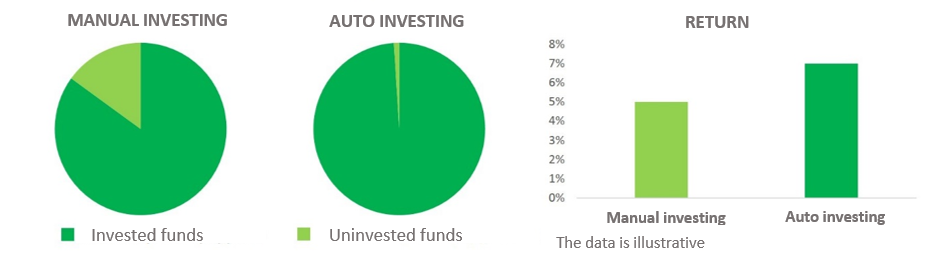 The automated receivable does not interfere with the manual purchasing of receivables in any way – you can use both options in your receivable strategy. There is a video coming soon on our website where we will demonstrate step-by-step how to work with our Auto Assign feature.